7 questions before you buy AI home inspection software
Seven questions that expose weak AI inspection software, with how to test each one in a trial or demo, plus Morph's own answers.

Series: Comparisons
- 01Leaving Horizon before December 15, 2026: 5 tools compared
- 02How we compare inspection software
- 037 questions before you buy AI home inspection software
One inspector on the InterNACHI forum wrote about dropping a report app after a batch of practice reports because it kept freezing. A sales page will not show you that. Each question below comes with a test you can run in a trial.
Morph makes AI inspection software, and I use these same questions on our own product below. Ask them of any vendor, including us.
Prices and features checked on 2026-11-16. Vendor answers come from each company's own pages, linked under each question.
The checklist: 7 questions and how to test each
1. Does the AI write the final wording, or do you approve every line?
You sign the report, so you own the words. Dictate a vague finding, such as a ceiling stain. Can the draft reach the report without your approval? Does it say more than you saw?
What the five vendors publish about approvalMore detail
- Binsr: its comment library is hand-written by inspectors, not AI-generated (features). Its AI handles dictation, photos, image annotation and merging minor comments into summaries (features).
- Hive: you approve every AI-drafted comment (features).
- Palmtech: its photo defect detector drafts comments that you review and add (software).
- Spectora: you review and approve every AI output before it goes into the report (features).
Checked 2026-11-16 on each company's own pages.
2. Does it draft from your own templates and style?
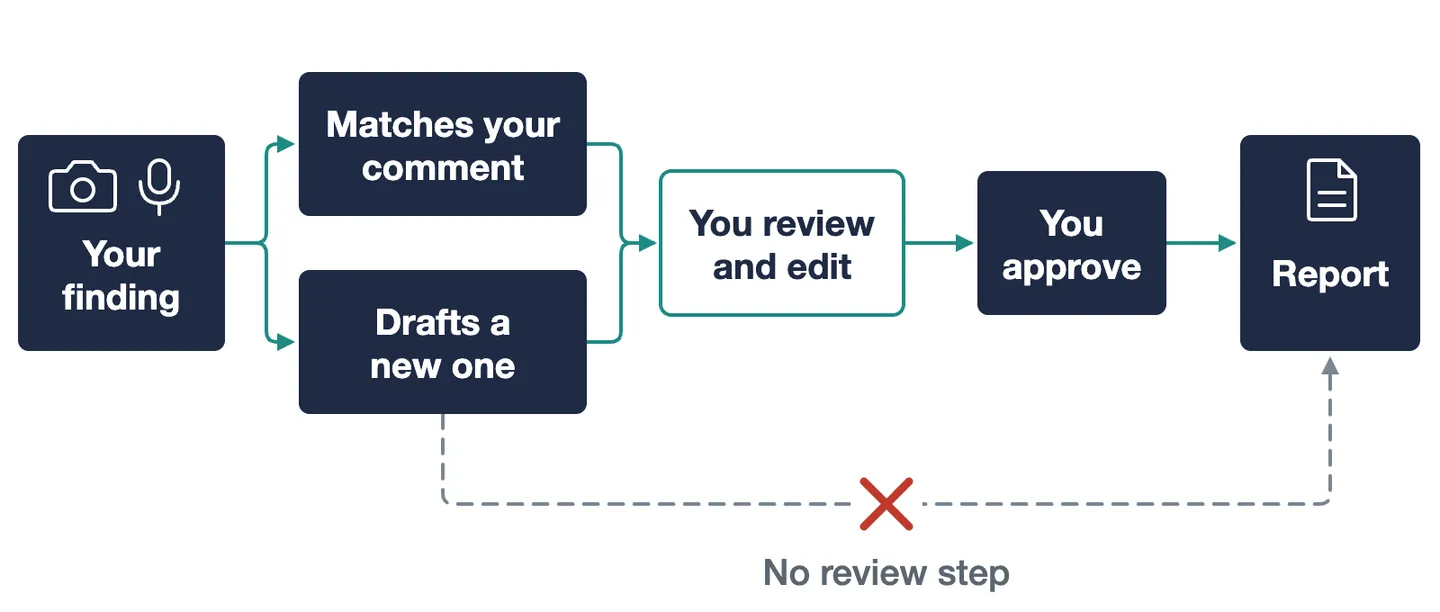
Your comment library holds wording you already stand behind. Load five of your own comments, dictate a finding that one of them covers, and see whether the tool picks yours or writes something new.
What each vendor says about your templates and its AIMore detail
- Binsr: its AI Instructions feature is pitched as AI that writes the way you write (features).
- Hive: Smart Add matches what you say or type to comments already in your template and drafts a new one only when nothing fits (AI page). A company sets one prompt for how comments read, including liability wording (AI Comment Assist).
- InspectorData: says its AI writes every comment in your own style (generate) and analyzes uploaded photos to detect defects and generate comments (features).
- Palmtech: you can edit pre-loaded templates or build your own (software). It offers AI comment suggestions, and its image defect detector drafts comments from photos (software).
- Spectora: Match pairs what you say with comments you already approved in your template (home page, features). Comment Assist drafts a comment title, options and description from a short prompt (support). Saving an AI comment to your template is off by default (support).
These are each vendor's own claims, checked 2026-11-16. We did not test them.
3. Is your inspection data used to train the vendor's AI?
Your reports hold client addresses, photos and your wording. Ask in writing, then read the privacy policy as well as the AI page. The two can cover different things.
What Hive and Spectora publish on AI trainingMore detail
- Hive: does not use your inspection data to train AI models (AI page). Its privacy policy says it does not use identifiable personal information to train AI models without legal basis or consent, and that third-party AI providers such as OpenAI and Anthropic process only the content you submit and are contractually barred from training on it (privacy).
- Spectora: its support page says AI Comment Assist is not trained on your personal data, inspection reports or account information (support). Its privacy policy says it may use de-identified information in aggregate form to train AI or machine learning systems (privacy). Read both pages.
Checked 2026-11-16.
4. Does it work with no signal?
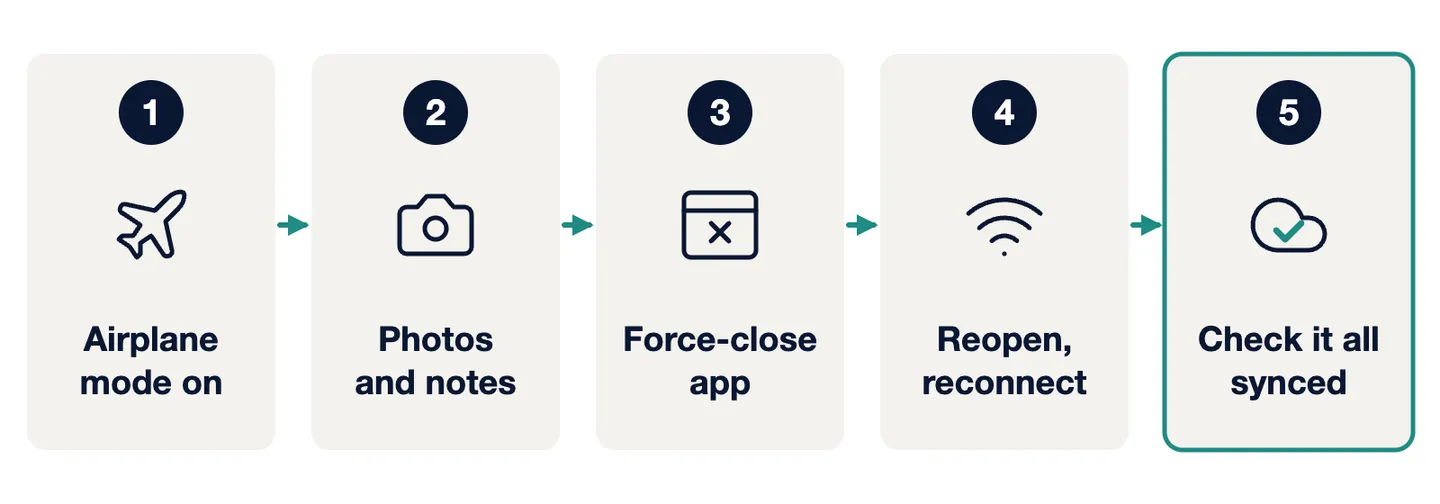
Crawlspaces and rural lots drop reception. Turn on airplane mode, take photos and notes in two rooms, force-close the app, reopen it, then reconnect and check that everything synced.
What vendors say about working offlineMore detail
- Hive: works without signal (features).
- InspectorData: its mobile app works offline and syncs when connected; photos save to the phone first and upload when you are back in range (features).
- Palmtech: its live data sync needs an internet connection (software).
Ask each vendor which parts work offline: capture, writing, AI drafting or sync. Checked 2026-11-16.
5. What is the real price at your volume?
Headline prices can leave out extra inspectors and per-report AI fees. Give the vendor your monthly inspection count and inspector count, and ask for the total in writing.
Published prices and what changes the totalMore detail
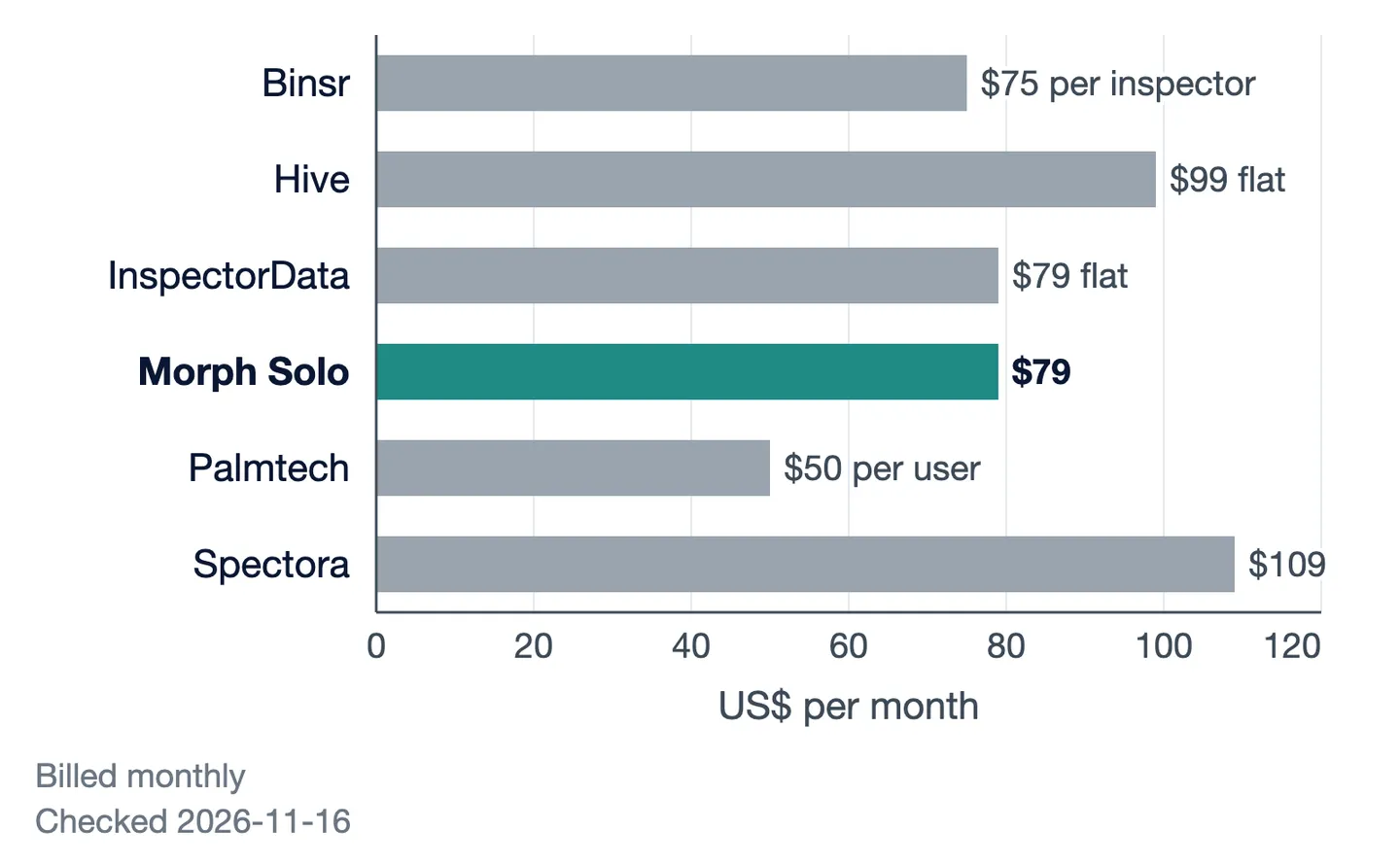
- Binsr: $75 per inspector per month, priced per seat (pricing).
- Hive: $99 a month, and the price stays the same at any inspection volume (pricing). Each extra inspector is $69 a month or $599 a year (pricing).
- InspectorData: $79 a month flat, or pay as you go at $15 per inspection (home page). AI reports: 2 free per account, then $8 per report on the $79 plan, or 1 credit per report on pay-per-inspection plans (generate).
- Palmtech: $50 a user per month, or $500 a user per year (pricing).
- Spectora: $109 a month on the monthly plan; monthly and annual plans, no contracts and no limits on inspections (pricing).
Checked 2026-11-16.
6. What does the free trial include?
Check how many reports the trial allows before you start. Spend one on a real job with a cluttered attic and bad light, and finish that report end to end.
Published trial termsMore detail
- Binsr: 5 free inspections, all features, no time limit (pricing).
- Hive: 5 free reports, no credit card, no time limit; it is a free trial, not a free plan (pricing).
- InspectorData: a card is required to start the trial; a $1 hold is placed and released, and you are not charged (home page).
- Palmtech: offers a free trial (pricing).
- Spectora: no time limit, no credit card, and two inspections (pricing).
Checked 2026-11-16.
7. What happens to your templates and past reports if you switch?
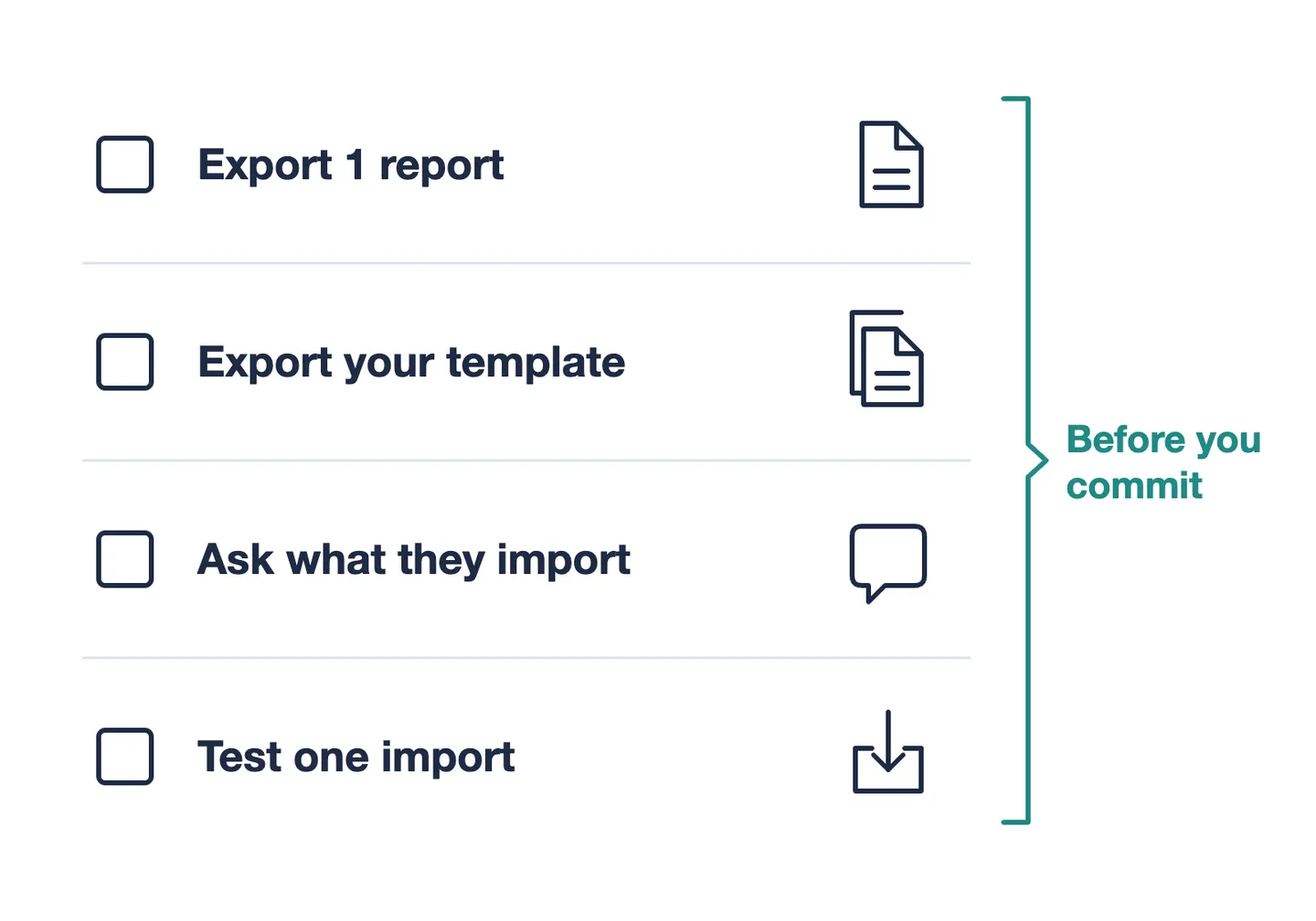
Your comment library is the slowest thing to rebuild. Before you commit, export one finished report and your template, and ask what the vendor imports for you and in what format.
Published migration helpMore detail
- Hive: its team imports your Horizon templates, client list and agent contacts for you, free, and imports past reports you export from Horizon (migrating from Horizon).
- Spectora: its support page describes a migration path for Horizon customers, including a one-click data migration tool that moves comments, presets, contacts, team members and branding (support).
Checked 2026-11-16.
How Morph answers these, gaps included
Morph is best for a solo inspector who wants drafts built from their own templates and past writing. It does not fit a multi-inspector firm yet: the Team plan has not launched. Morph uses your templates, comments, voice notes and wording only to write your own reports, never to train its AI and never for anyone else.
A fair comparison should also state these gaps: no API access, template import is Spectora .xls only, the TREC form is not live, and there is no published accuracy data.
Morph's written answers to all seven questionsMore detail
1. Final wording
- Why it matters: You sign the report, so you own the words.
- How to test it: Dictate a vague finding and see whether it can reach the report without your approval.
- Morph's answer (checked 2026-11-16): "Morph drafts and organizes, you review and decide. Nothing is sent without your approval." The inspector signs the report.
2. Your templates and style
- Why it matters: Your comment library holds wording you already stand behind.
- How to test it: Load five of your comments, then dictate a finding one of them covers.
- Morph's answer (checked 2026-11-16): Turns your photos and voice notes into report narratives in your own style, built from your imported templates and past writing. It also analyzes photos. No accuracy numbers are published.
3. AI training
- Why it matters: Your reports hold client addresses, photos and your wording.
- How to test it: Get the answer in writing, then read the privacy policy too.
- Morph's answer (checked 2026-11-16): "We don't use your reports to train AI models." Homeowner identifiers are not sent to AI models. Your templates, comments, voice notes and wording are used only to write your own reports.
4. No signal
- Why it matters: Crawlspaces and rural lots drop reception.
- How to test it: Airplane mode on, capture in two rooms, force-close, reconnect, check the sync.
- Morph's answer (checked 2026-11-16): "Capture photos and voice notes with no signal; AI drafting runs when you're back online."
5. Price
- Why it matters: Headline prices can leave out extra inspectors and per-report AI fees.
- How to test it: Ask for the total at your inspection count, in writing.
- Morph's answer (checked 2026-11-16): Solo is $79 a month or $790 a year, with no monthly limit on inspections or AI-drafted reports. Team is "Coming 2027", with no price.
6. Free option
- Why it matters: The trial's report count decides how much real work you can test.
- How to test it: Spend one trial report on a messy real job, end to end.
- Morph's answer (checked 2026-11-16): A free plan with 5 AI report generations per month, voice notes turned into AI-polished text, and 1-click report export.
7. Switching
- Why it matters: Your comment library is the slowest thing to rebuild.
- How to test it: Export one report and your template, then test one import.
- Morph's answer (checked 2026-11-16): Spectora .xls template import, plus Scheduled Onboarding on Solo. PDF report import is coming soon. Reports export one at a time.
Who should not buy AI home inspection software yet
If you cannot trial a tool on real jobs before your busy season, wait. A demo usually runs on a clean sample report. One inspector in that InterNACHI thread described Palmtech Version 9 freezing, scrolling slowly and closing without saving once a few sections were filled. After a batch of practice reports, they dropped it. Another in the thread said Palmtech moved their template to the new version and liked it.
If you hope software will make the call for you, wait too. The AI drafts; the licensed inspector reviews it and signs it.
To run these tests on Morph, start with the free plan. If it is not a good fit, that is fine too.
Spectora, Hive, Binsr, InspectorData and Palmtech are trademarks of their owners. Morph is not affiliated with or endorsed by them.
Ready to streamline your inspections?
Morph uses AI to help inspectors work faster and deliver better reports.